
Jamf Pro Integration: Mass Deploy Pareto
Using DMG
When you want to use Fill user templates for deployment.
We first need to create a new Script in Jamf Pro by going to Settings > Computer Management > Scripts. The address should look something like https://niteo.jamfcloud.com/view/settings/computer/scripts
In the General section, give the Script a Display Name, Pareto Security.
In the Script section, paste the following code:
#/bin/bash

if [ ! -f /Applications/Pareto\ Security.app/Contents/Info.plist ]; then
    echo "Installing Pareto Security!"
    tmpdir=$(dirname $(mktemp -u))
    curl -fsSL https://paretosecurity.app/download/pareto-mac -O $tmpdir/app.zip
    unzip -o $tmpdir/app.zip -d /Applications/
    rm -rf $tmpdir
    echo "Done installing Pareto Security!"
else
    echo "Pareto security is already installed!"
    # If you enable the next line it will also force the update
    # open paretosecurity://update
fi

if [ -z "$4" ]; then
    echo "Team invite not supplied"
else
    echo "Activating with team invite"
    /Applications/Pareto\ Security.app/Contents/MacOS/Pareto\ Security -mdmTeam "$4"
fi

open paretosecurity://open
<button class=“hextra-code-copy-btn active:hx-opacity-50” title=“Copy code”
<div class="copy-icon group-[.copied]/copybtn:hx-hidden"></div><div class="success-icon group-[.copied]/copybtn:hx-block"></div>Use other options at their defaults.
Policy
Create a new Policy named Pareto Security. The address should look something like https://niteo.jamfcloud.com/policies.html
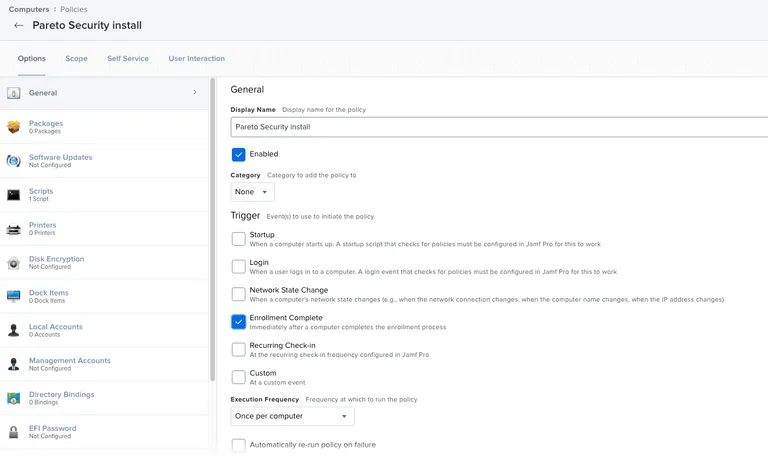
Select the Pareto Security script. We now need to enter the team invite link you got when you invited a user to Pareto Cloud.
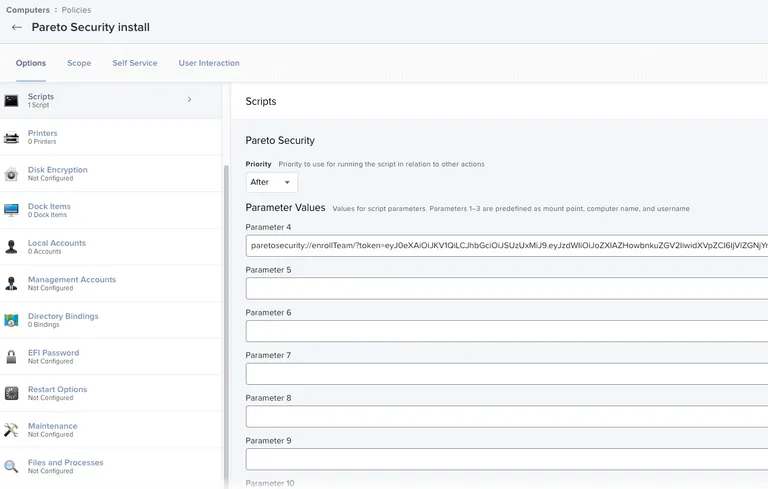
That’s it. You then apply the Policy the way you would normally.
Using PKG
- Download the latest release from https://paretosecurity.app/download/pareto-mac
- Before installing, create a file named ‘BundledActivation.txt’ at the path /Library/Pareto Security/.
- Install Pareto Security with the installer app.
- The file must contain an activation token in the first line, starting with eyJ0eXAiOiJKV1QiLCJhbGciOiJSUzUxMiJ9.