
EDR vs antivirus: Where device posture fits alongside them
Ransomware appeared in 48% of the confirmed data breaches analyzed in Verizon's 2026 Data Breach Investigations Report, up from 44% in the previous edition. Because ransomware often gets in through the devices people work from, technical teams tend to ask which endpoint tools they need: EDR (endpoint detection and response), antivirus, or both.
 Dejan Murko
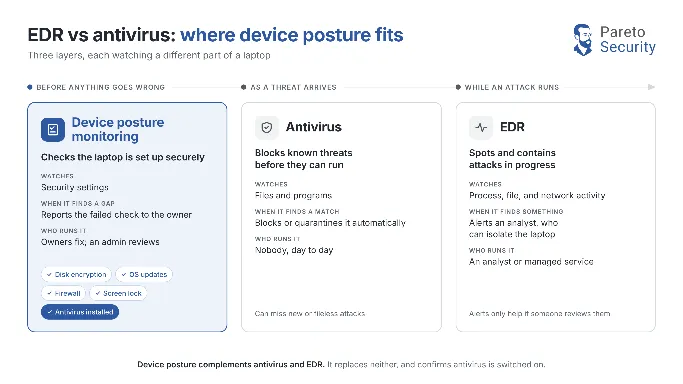
The two are often sold as rivals, but they watch different things. EDR records what happens on a device so someone can spot and contain an attack, while antivirus blocks known threats as they arrive.
Still, neither is built to check whether a laptop’s disk is encrypted, its updates are installed, or its screen locks when someone walks away. That job belongs to a third layer, device posture, which confirms a device is set up securely before anything goes wrong.
We compare all three layers side by side, cover what posture checks can’t do, and show how to choose your layers and the order to add them.
Pareto Security, which published this article, is featured in the comparison.
EDR vs antivirus at a glance
- EDR is detection and response: it sends device activity to a console and raises alerts that someone has to triage.
- Antivirus is prevention: it checks files against known threats and quarantines matches, with little to manage.
- Device posture is configuration: it checks that disk encryption, OS updates, the firewall, screen lock, and antivirus are switched on.
- Antivirus and EDR often run together, and many EDR products now include antivirus-style prevention in the same agent.
- Antivirus catches known malware but can miss new or fileless attacks; EDR is designed to spot those by watching how programs behave on the device.
What is EDR vs antivirus software?
EDR is security software that records what happens on a device so someone can spot and contain an attack. It works by sending device activity to a central console, where suspicious patterns are flagged for review.
Antivirus is software that blocks and removes malicious code. It works by checking files against a database of known threats and quarantining any match automatically.
The key difference is that EDR looks for suspicious behavior while antivirus catches known malicious files.
What antivirus, EDR, and device posture each do
Antivirus, EDR, and device posture monitoring each watch a different part of a laptop. Antivirus watches files and programs for known malicious code, EDR watches device behavior for signs of an attack, and device posture monitoring watches the security settings that make an attack harder to start.
Antivirus
Antivirus tools are software that detects malicious code, prevents it from infecting a system, and removes code that’s already there, according to NIST’s definition of antivirus tools. Antivirus acts automatically and needs almost no day-to-day attention.
Whether a Mac needs a separate antivirus product is its own question, and this article on why you don’t need an antivirus for Mac answers in full.
EDR (endpoint detection and response)
Endpoint detection and response combines “real-time continuous monitoring and collection of endpoint data” with “rules-based automated response and analysis capabilities,” as the US Office of Management and Budget’s memo M-22-01 puts it. In practice, an EDR agent records process, file, and network activity and sends it to a console where an analyst works the alerts.
Device posture monitoring
Device posture monitoring checks whether a device’s security settings are configured as they should be: disk encryption on, OS and apps up to date, firewall enabled, and screen lock set. It reads settings and reports gaps, and leaves files and activity alone.
Pareto Security is built for this layer, with read-only checks on macOS, Linux, and Windows.
Posture checks can also confirm that antivirus is present, which is exactly what our Windows check that antivirus is installed does.
EDR vs antivirus vs device posture compared
Antivirus, EDR, and device posture monitoring differ most on who runs them, what they cost, and whose laptops they can run on. The table compares the three layers across eight dimensions, including the cost, people, and personal-laptop rows that usually decide a purchase.
| Antivirus | EDR | Device posture monitoring | |
|---|---|---|---|
| Best for | Every device, as a baseline | Teams with someone to triage alerts | Proving each laptop is configured securely |
| What it watches | Files and programs | Process, file, and network activity | Security settings |
| What it does when it finds something | Blocks, quarantines, or removes | Alerts an analyst, who can isolate the device | Reports the failed check for the owner to fix |
| What it misses | New or fileless attacks; risky settings | Most settings checks; alerts nobody reviews | Malware and attacks in progress |
| Who has to run it | Nobody, day to day | An analyst or managed service | Owners fix; an admin reviews |
| Cost model | Often built into the OS; suites priced per device | Per-device subscription plus analyst time | Free app; Pareto Cloud free for 5 devices, then per device |
| Works on personal and contractor laptops | Yes, if the owner installs it | Rarely; owners resist monitoring agents | Yes; the owner runs a free app |
| Compliance evidence it produces | SOC 2, CC6.8 | SOC 2, CC6.6 | Mapped by Pareto to SOC 2 CC6.1, CC6.6, CC6.7, and ISO 27001 Annex A.8 |
Definitions follow NIST and the US OMB; SOC 2 cells cite the AICPA Trust Services Criteria, and posture mappings are Pareto’s own. If you’re curious about how posture checks map to one compliance framework, explore this breakdown of Mac device requirements for ISO 27001.
How the three layers differ in practice
The three layers differ in four practical ways: how each one detects a problem, what it does next, who has to act on it, and how much it sees on someone’s laptop. Those four differences decide whether a team can actually run each layer.
Detection: Signatures, behavior, and settings
Antivirus recognizes threats it already knows. Classic products match files against signatures of known malware, while next-generation antivirus adds behavior rules to catch new variants as they run.
EDR looks for suspicious sequences in recorded activity, whether or not it recognizes the file involved. A typical example is a document opening a script that then contacts an unknown server.
Device posture monitoring detects risky conditions: an unencrypted disk, a disabled firewall, an update that was never installed. Patching lag is a real exposure, since the median time to fully fix a critical vulnerability in CISA’s Known Exploited Vulnerabilities catalog rose to 43 days from 32, Verizon’s 2026 DBIR executive summary reports.
Response: Quarantine, isolation, or a fix
Antivirus responds on its own: it blocks, quarantines, or deletes the file and notifies the user.
EDR can isolate a laptop, stop processes, and collect evidence, sometimes automatically. The bigger decisions wait for a person, so every alert needs someone to read it.
Device posture monitoring responds with a fix the owner makes. The check names the failed setting and explains how to change it, but it never changes anything itself: check, don’t control.
People and cost: Who runs each layer
Antivirus costs little in money or time; it often ships with the operating system and runs itself.
EDR is the layer where cost means people. Someone has to triage alerts daily, or the team pays a managed EDR provider to do it. That spend makes sense when an analyst is available, the data is regulated, or a cyber insurer or customer requires EDR.
Posture checks are light on both counts. Owners fix their own settings, an admin reviews the results, and the desktop app is free.
Privacy and personal laptops
Privacy is where the layers part company. EDR sends device activity to a company console, which is reasonable on a company laptop and a hard sell on a personal or contractor one.
Posture checks read only security settings. For example, Pareto’s read-only, non-invasive monitoring never accesses personal files or applications, and its open-source code lets anyone confirm that.
That makes posture checks workable on hardware the company doesn’t own. This guide to personal laptop and BYOD device security shows how teams verify encryption, updates, and screen lock without an MDM.
Where device posture fits alongside EDR and antivirus
Device posture monitoring sits beside antivirus and EDR as a peer layer. Antivirus blocks known malware and EDR catches attacks in progress; posture monitoring confirms antivirus is installed and that the laptop’s own defenses, from disk encryption to automatic updates, are switched on.
Our non-invasive device monitoring for teams gathers every laptop’s results in one dashboard, so an admin sees which machines need attention without managing them.
Pareto maps its device checks to SOC 2 CC6.1, CC6.6, and CC6.7 and ISO 27001 Annex A.8. Our compliance reporting turns those results into audit evidence for the device layer, rather than the whole audit.
What device posture can’t do
Device posture monitoring checks settings, so it can’t defend a laptop on its own. A team running posture checks without antivirus or EDR still has gaps, and naming them makes it easier to decide what to add. Device posture monitoring can’t do the following:
- Stop malware. Posture checks confirm antivirus is installed but don’t scan or block anything.
- Spot an attack in progress. A compromised laptop with every setting correct still passes every check; catching that is EDR’s job.
- Investigate an incident. There’s no activity record to search or device to isolate.
- Enforce settings. Read-only checks report a disabled firewall, and the owner turns it back on; pushing settings centrally takes an MDM.
The Layer Fit Matrix: Which layers your team needs
The Layer Fit Matrix maps each situation to the layers it needs, in the order to add them. It weighs who would read security alerts, who owns the laptops, which operating systems the team runs, and whether a compliance review or customer questionnaire is coming.
| Situation | Layers to add, in order |
|---|---|
| A developer or founder securing their own laptop | Antivirus, then posture checks |
| Company laptops, nobody on security, and a customer questionnaire due | Antivirus, then posture monitoring with reports for the questionnaire, then managed EDR if a customer or insurer requires it |
| A team using personal or contractor laptops needing device security checks | Posture checks on every device, antivirus by policy, then EDR on company-owned devices |
| A team with an analyst or managed EDR, handling regulated data | Antivirus and EDR together, then posture monitoring |
| A mixed macOS, Linux, and Windows fleet | Posture checks across all three, then antivirus and EDR where each supports the OS |
Write the result down as your endpoint stack: which layer covers which risk, and who acts on each. That short description is easier to defend in a customer security review or an insurance form than a list of product names.
Frequently asked questions about EDR vs antivirus
Is next-generation antivirus the same as EDR?
Next-generation antivirus and EDR are separate layers. Next-gen antivirus still focuses on blocking malware on the device, using behavior and reputation as well as signatures, while EDR records activity over time for investigation and response. Vendors often list the two as separate capabilities, even when one agent delivers both.
Which is better, EDR or XDR?
EDR versus XDR comes down to scope: XDR (extended detection and response) adds signals from email, identity, network, and cloud to the endpoint data EDR collects. XDR suits teams with analysts who can work correlated alerts. For a team without an analyst, XDR mostly adds alerts.
Is Microsoft Defender an EDR or XDR?
Microsoft Defender for Endpoint is an endpoint platform that includes both endpoint detection and response and next-generation protection, according to Microsoft’s Defender for Endpoint overview. It feeds the wider Microsoft Defender portal, which correlates endpoint signals with identity, email, and cloud alerts. Microsoft brands that wider layer Microsoft Defender XDR.
Do antivirus, EDR, and posture tools cover Mac and Linux?
Antivirus, EDR, and posture tools vary in platform coverage, so check each vendor’s list. Microsoft’s Defender for Endpoint documentation lists Windows, macOS, Linux, Android, and iOS. The Pareto Security desktop app runs on macOS, Windows 11, and Linux, including Ubuntu, Arch, Fedora, and NixOS.
Start with the device security layer that fits your situation
If nobody would read security alerts, that means antivirus on every device and posture checks proving encryption, updates, and screen lock are on. EDR follows once someone can triage its alerts, or when a customer, insurer, or regulator asks for it.
If you’re starting with your own laptop, the free Pareto Security desktop app for macOS, Linux, and Windows shows which settings need fixing. It also gives you the words to make the case for all three layers at work.
Dejan Murko
Product Lead at Niteo.

